Taking over a WordPress site from another developer: the handover checklist
Changing developers is a normal part of running a website, but a messy handover can leave you locked out of your own domain. Here is the checklist I use when I take over a WordPress site, so nothing important is lost on the way.
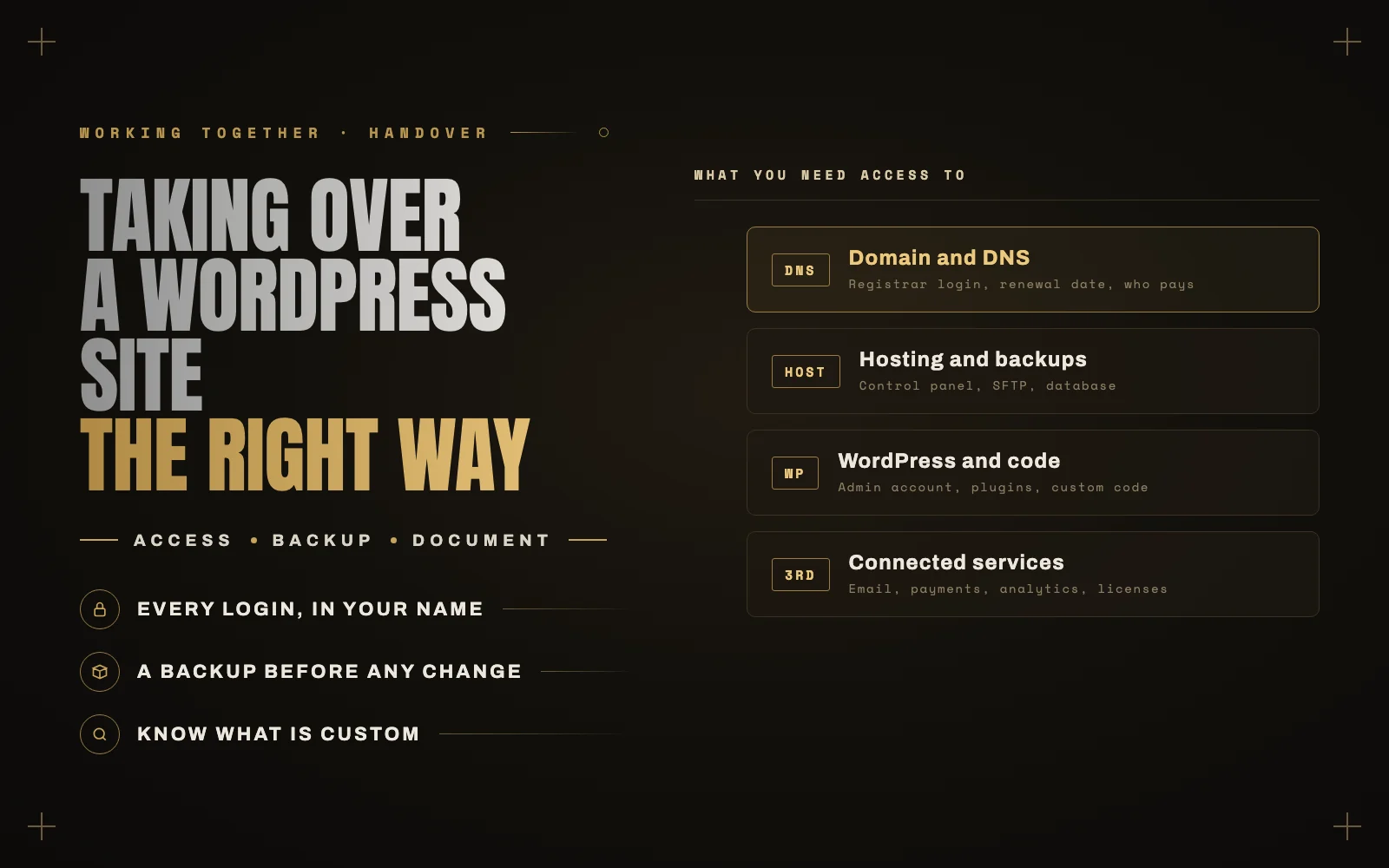
A good share of my work is taking over WordPress sites that someone else built. Sometimes the previous developer has moved on to other work, sometimes the relationship ended badly, and sometimes they simply disappeared.
The technical part of a handover is usually straightforward. The hard part is access. I have seen businesses discover that their domain was registered in a former freelancer’s personal account, or that the only copy of their custom code was on someone else’s computer.
Here is the checklist I work through, whether the previous developer is helping or not.
1. Make sure you own the domain
This comes first because it matters most. Whoever controls the domain controls the website and, usually, the email.
- Find out where the domain is registered, and make sure the account is in your business’s name, with your email address.
- Check the renewal date and that auto-renew is on, with a payment method you control.
- Find out where DNS is managed. It may be at the registrar, the host or a service like Cloudflare. You need a login for that too.
If the domain is in someone else’s account, ask for it to be transferred to yours. Do this before anything else, while relations are still friendly.
2. Get hosting access in your name
- The hosting account itself should be yours, paid by you. If the previous developer hosted the site on their own account, plan a move.
- Control panel, SFTP and database access, ideally through your own account with separate users for any developer.
- Know what plan you are on and whether it still fits the site.
3. Take a full backup before changing anything
Before the new developer touches anything, take a complete backup of all files and the database, and store it somewhere off the server. Then confirm it is complete.
That backup is your safety net for everything that follows, and it records exactly how the site was when you took it over.
4. Sort out WordPress accounts
- Make sure you have an administrator account of your own, with your email address.
- Create a separate account for the new developer rather than sharing yours.
- Remove or downgrade the previous developer’s accounts once you have confirmed you have full access. Do this after the handover, not before.
- Change passwords for any shared accounts, and turn on two-factor authentication for administrators.
5. Understand what is custom
This is where a lot of hidden risk lives.
- Is the theme a child theme, or was the parent theme edited directly? Direct edits are lost the next time the theme updates.
- Is there custom code, in a custom plugin, the theme’s functions file or a code snippets plugin? Where is it, and is there a copy in version control?
- Ask for the Git repository if one exists, and move it to an account you own.
- List anything unusual: custom post types, integrations, scheduled tasks, or anything the previous developer described as “don’t touch this”.
6. Inventory plugins and licenses
- List every plugin and what it does. It is common to find several doing the same job, or plugins that are not used at all.
- Check premium plugin and theme licenses. Many are registered to the developer’s account rather than yours, which means no updates once they leave. Transfer them or buy your own.
- Note anything outdated or abandoned for the new developer to deal with.
7. List the connected services
Websites quietly depend on other services. Make sure you have your own access to each one:
- Email delivery: the service that sends contact form and order emails.
- Payments: Stripe, PayPal or other gateways, in your business’s name.
- Analytics and Search Console, with you as the owner, not just a user.
- CDN and security services such as Cloudflare.
- Marketing tools: email marketing, CRM, chat widgets and anything else connected.
8. Write it all down
Keep one document with where everything lives, who has access and when things renew. Store passwords in a password manager, not in the document itself.
The next time you change developers, the handover will take an afternoon instead of weeks.
You should be able to fire your web developer tomorrow without losing your website. If you could not, fix that first.
If the previous developer is not helping
It happens. You can still recover most of this.
- Domains can usually be recovered through the registrar with proof that you own the business.
- Hosting can often be recovered through the host’s support, with proof of ownership and payment.
- If you have WordPress admin access, a new developer can take a full backup and move the site to hosting you control.
It is slower and more frustrating, but it is rarely the end of the website.
Let me take it over
I take over WordPress and WooCommerce sites regularly, including ones with no handover at all. I will secure your access first, document what is there, and then get the site properly maintained. Have a look at WordPress maintenance and care or get in touch.
Keep reading
 Working Together
Hiring an offshore WordPress developer: how to do it safely, from someone on the other side
I am a WordPress developer in Lahore, and most of my clients are in other countries. Here is how to hire an… Read article ↗ Working Together
What a WordPress maintenance plan should include, and what it should cost
Most WordPress care plans promise updates, backups and security. The difference between a good one and a useless one is in the… Read article ↗ Working Together