If you write content for search, you know the problem. You put hours into research and a solid draft, then you publish it as a wall of paragraphs that looks like every other post on page one. Readers skim it, bounce, and the post never earns the links or the time on page it deserved.
The usual fix is a page builder: nice boxes and buttons, plus heavy scripts, slower pages and content locked into shortcodes. For a blog post, that is a bad trade.
I built iStyleBlox to fix this inside the normal WordPress block editor. Version 2.0.0 is the biggest update since launch, and this post is built with it. Every box, list and button below is an iStyleBlox block.
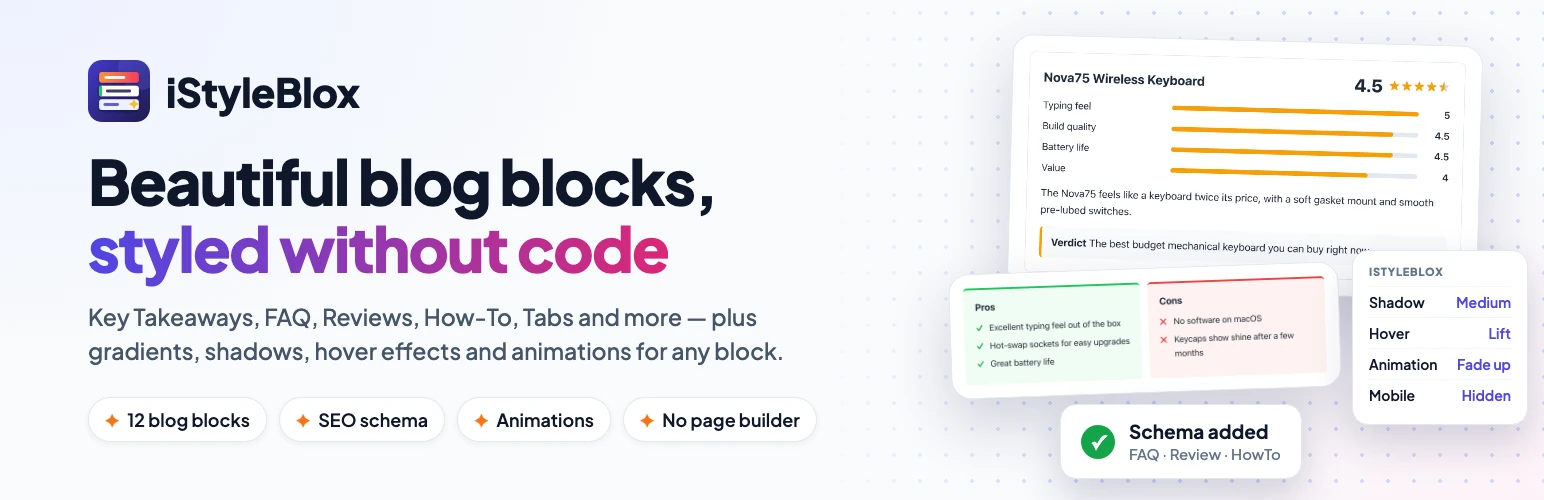
- iStyleBlox 2.0 is free and adds 5 new blocks, for 12 in total: Pros & Cons, Review Box, How-To Steps, Tabs and Testimonial.
- FAQ, Review and How-To blocks print clean JSON-LD schema automatically, once per page, and each type can be switched off.
- A styling panel for any block: gradients, per-side spacing, shadows, hover effects, scroll animations and hide-on-device.
- CSS and JS load only on pages that use the blocks, and existing posts keep working without re-saving.
In this post
Table of contents will be generated here.
The five new blocks in 2.0
Pros & Cons
Two side-by-side columns, ticks on one side and crosses on the other. It is the fastest way to make a comparison post scannable. There is one further down.
Review Box
A star rating, scored criteria (like “ease of use” or “value”), a summary and a verdict, in one tidy box. It outputs Review schema automatically, so search engines can read the rating. Use it for products and services you have actually tested.
How-To Steps
Numbered steps with a title, description and total time, plus HowTo schema. The install guide below is one.
Tabs
Related content side by side without a longer page: plan comparisons, or options for different audiences.
Testimonial
A quote with name, role, photo and optional stars, for real client feedback.
Here is how I combine the blocks for different kinds of posts:
Reviews
Open with Key Takeaways, score the product with a Review Box, weigh it up with Pros & Cons, and close with a CTA Box or Product Card.
Tutorials
Put the steps in How-To Steps, warn readers about common mistakes in a Note Box, and answer follow-up questions with an FAQ.
Long guides
Start with a Table of Contents, use Tabs to compare options side by side, add a Testimonial from a real client, and finish with an Author Box.
A styling panel that works on any block
Every block in the editor, including core paragraphs, headings and images, gets an iStyleBlox panel in the sidebar. In 2.0 it adds:
- Gradient backgrounds, alongside solid colors.
- Per-side padding and margin, so you can set top and bottom spacing separately.
- Shadow presets: small, medium, large and glow.
- Hover effects: lift, grow, shadow and dim.
- Scroll animations: fade in, fade up, slide from left or right, and zoom in. They respect your reader’s “reduced motion” setting.
- Hide on mobile, tablet or desktop, for content that only makes sense on one screen size.
The box at the end of this post uses a gradient, a large shadow, the lift hover effect and a fade-up animation, all set from that panel with no custom CSS.
Built-in SEO schema, and what it does for you
Structured data tells search engines and AI assistants what each part of a page is: a question and answer, a rated review, the steps of a process. Writing that JSON-LD by hand is fiddly and easy to break.
iStyleBlox writes it for you. FAQ blocks produce FAQPage schema, Review Boxes produce Review schema and How-To Steps produce HowTo schema. FAQ items from every FAQ block on a page are combined into a single FAQPage, printed once, the way Google expects.
To be straight with you: valid schema does not guarantee rich results. Google now shows FAQ rich results for very few sites and has retired How-To rich results, while review snippets still appear for genuine reviews. The schema is still worth having, because it describes your content clearly to every search engine and assistant that reads it.
If your SEO plugin already outputs one of these types, your developer can switch iStyleBlox’s version off with the istyleblox_faq_schema, istyleblox_review_schema or istyleblox_howto_schema filter, so you never ship duplicates.
Google’s guidelines treat reviews a business writes about itself as self-serving, and won’t show review stars for them. Use the Review Box for products and services you review, not for your own. That’s why this post has no Review Box.
Why use it: the honest version
Why use iStyleBlox
- Free, with no premium version holding features back
- No page builder: it works inside the normal block editor
- Schema markup is generated for you, no JSON by hand
- Assets load only on posts that use the blocks
- Styles any block, including core blocks
Things to know
- Needs the block editor, not the Classic Editor
- If your SEO plugin already outputs FAQ or HowTo schema, switch one off to avoid duplicates
- Rich results are Google’s call: valid schema does not guarantee them
Faster and more accessible
iStyleBlox now loads its CSS and JavaScript only on pages that use its blocks, so everything else loads nothing extra. That matters for Core Web Vitals, as I found when fixing my own site. Tabs now work fully from the keyboard, and table of contents links work for headings in any language, not only English.
Will my existing posts break?
No. Posts made with earlier versions keep working without being re-saved, including 1.0 FAQ blocks that carried their own schema.
How to install or update iStyleBlox
Install the free plugin from your WordPress dashboard. No account or API key needed.
Total time: 2 min
Open Plugins, Add New
In your WordPress dashboard, go to Plugins → Add New Plugin.
Search for iStyleBlox
Type iStyleBlox into the search box at the top right.
Install
Click Install Now on the iStyleBlox card.
Activate
Click Activate. The blocks appear under iStyleBlox in the block inserter. Already installed? Update to 2.0.0 from Plugins → Installed Plugins instead.
Frequently asked questions
See all 12 blocks on the iStyleBlox plugin page. If you need custom blocks for your own site, that is my custom WordPress plugin development work, so get in touch.
Make your next post look designed
iStyleBlox 2.0 is free on WordPress.org. Install it, open your next draft and add a Key Takeaways block. It takes two minutes.
Get iStyleBlox free